ADT vs Frontpoint
Our experts compare two industry giants, ADT and Frontpoint, to see what their strengths and weaknesses are.


 &
&
 Last Updated on Jun 02, 2026
- Professional installation for all Pro Install systems; DIY installation available separately through ADT Blu
- 24/7 monitoring with six redundant centers across the U.S.
- Over 150 years of security expertise and innovation
- Fast and easy DIY installation
- Smart home features and integrations
- Industry’s best customer service
Comparing ADT and Frontpoint is a bit like comparing apples to oranges. One is a traditional professionally installed service, the other is a modern DIY system. But which one is better?
Well, that all depends.
In this comparison, I’ll be looking at the ADT Video Package and a customized system I bought from Frontpoint. I’ll be going over the two systems’ similarities, differences, and installation processes. Next, I’ll move on to professional monitoring, then customer support. Finally, I’ll end by comparing their apps before telling you which system I recommend overall. Our comparison of Frontpoint and ADT starts now!
Key Similarities of ADT vs. Frontpoint
I’ll admit that I can get a little wordy, so before you buckle down and get into the nitty-gritty of the systems, I want to tell you what ADT and Frontpoint have in common.
- Equipment: ADT and Frontpoint offer wireless equipment compatible with smart home automation, indoor and outdoor cameras, and video doorbells.
- 24/7 professional monitoring required: Both companies require that you pay a monthly fee for 24/7 professional monitoring and cellular backup.
- Highly-rated apps: The ADT Pulse app and the Frontpoint app have high ratings from Android and iPhone users.
Key Differences of ADT vs. Frontpoint
Next, I’m going to tell you the main ways that ADT and Frontpoint are different from each other.
- Customer support: ADT has had a few missteps in terms of customer support in the past, but criticism of Frontpoint is hard to come by.
- Return policies: ADT gives refunds within six months if they cannot resolve an issue, while Frontpoint gives you 30 days for a total refund for any reason.
- Contract lengths: Frontpoint requires a three-year contract, while ADT offers month-t0-month options.
Perfect! Now let’s see what’s actually included in these systems.
ADT vs. Frontpoint System Components
| Feature | ADT Video Package | Frontpoint Customized System |
|---|---|---|
| Touch Screen Hub | No | Yes |
| Keypad | Yes | Yes |
| Motion Sensor | Yes | Yes |
| Entry Sensor | Yes | Yes |
| Glass Break Sensor | Yes | Yes |
| Key Ring Remote | Yes | Yes |
| Smart Lock | Yes | Yes |
| Indoor Camera | Yes (from Google Nest) | Yes |
| Video Doorbell | Yes (from Google Nest) | Yes |
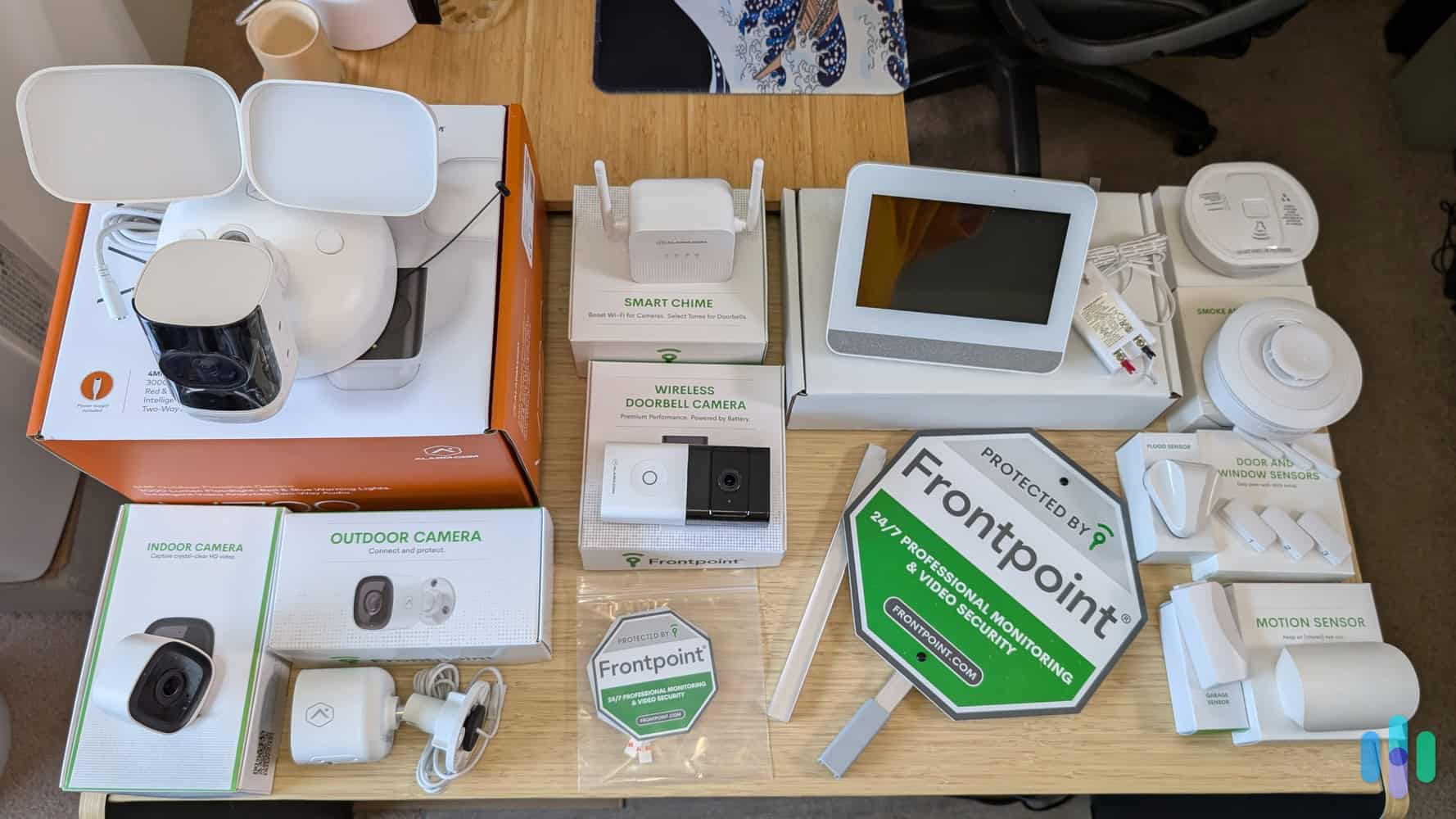
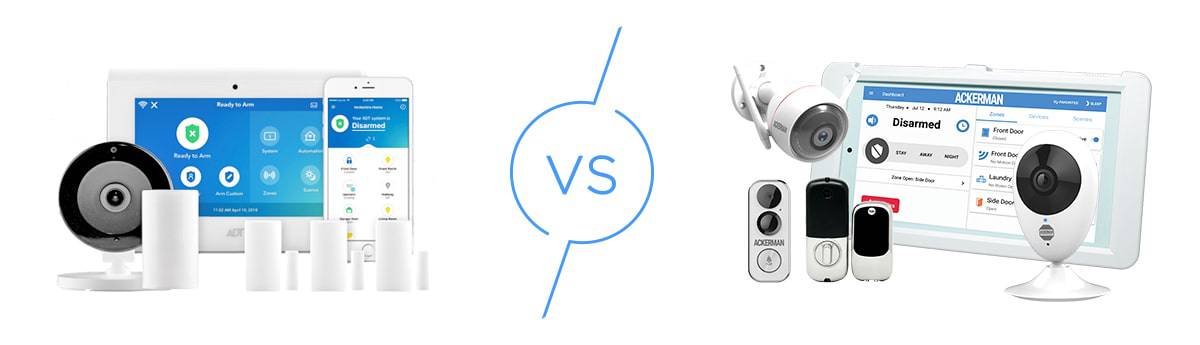
The ADT Video Package and the customized Frontpoint system I bought are pretty similar, as you can see. Both give you a keypad, motion, entry, and glass break sensors, keyring remotes, smart locks, video doorbell cameras, and indoor cameras.
ADT vs. Frontpoint Equipment Costs
As I mentioned above, ADT and Frontpoint take different approaches when it comes to home security, and that manifests in multiple ways. When it comes to equipment, though, payment is pretty similar. You can choose to pay for your equipment upfront, or roll it into your monthly bill over the term of your contract. Both companies also let you customize your system online, which is a great perk. In the past, ADT made you talk to a customer service representative to build out your system. Who wants to pick up a phone these days?
ADT’s Costs
That said, here’s what your equipment costs are going to look like. We’ll start with ADT.
| Equipment | Price |
|---|---|
| Cameras | |
| Google Nest Cam | $179.99 |
| Google Nest Doorbell (battery or wired) | $179.99 |
| Google Nest Cam (Indoor) | $99.99 |
| Smart Home Security | |
| Contact Sensor | $14.99 |
| Motion Detector | $24.99 |
| ADT Keypad | $89.99 |
| Keychain Remote | $19.99 |
| Smart Home Products | |
| Google Nest Mini | $49.99 |
| Google Nest Hub | $99.99 |
| Google Nest Hub Max | $229.00 |
| Google Nest Thermostat | $129.99 |
| Environmental Sensors | |
| Smoke Detector | $39.99 |
| Water and Temperature Sensor | $34.99 |
This is an extensive list that can be tailored to numerous types of homes and security needs. Keep in mind, though, ADT requires professional installation — expect to pay around $150 depending on the size of your property. If you prefer a DIY approach, that’s available separately through ADT Blu, which uses a different equipment lineup.
Frontpoint’s Costs
Now let’s take a look at what Frontpoint has to offer:
| Equipment | Cost |
|---|---|
| Indoor Camera | $65.99 |
| Contact Sensor | $19.24 |
| Motion Sensor | $38.49 |
| Wireless Doorbell Camera | $164.98 |
| Glass Break Sensor | $41.24 |
| Flood Sensor | $24.74 |
| Smoke and Heat Sensor | $38.49 |
As you can see, this list is a little more lean than ADT’s. Still enough options to comprehensively protect your property, but there aren’t a whole lot of bells and whistles here. Also keep in mind that these prices include Frontpoint’s “current” 45 percent off discount — current in quotation marks because in my years of covering home security equipment, I’ve never seen this equipment sell for full price. The “sale” is a marketing effort to make people feel like they need to buy soon to take advantage of savings. Don’t worry, though, I doubt we’ll ever see that discount go away.
ADT vs. Frontpoint Installation
For the most part ADT requires professional installation, which means users get an overall white-glove experience. On the other hand, Frontpoint is completely DIY, which might be preferable for people who like doing things themselves.
Something to note: even though ADT Pro Install is primarily a professionally installed service, ADT does offer a separate DIY platform called ADT Blu. It uses a different equipment lineup from what’s covered in this comparison, but you can read more about it in our ADT Blu review.
ADT Installation

We’re glad that ADT sent a technician out to install our ADT Video Package. Our system included cameras and a Kwikset Deadbolt, which in our experience, can be quite a handful to install.
The technician who installed our system was very professional. He walked us through the process, explained how each device worked, and then sat down and discussed how to operate the system. This kind of professional installation is exactly why we love ADT. All in all, it took the tech a couple of hours to complete the installation.
Installing Frontpoint
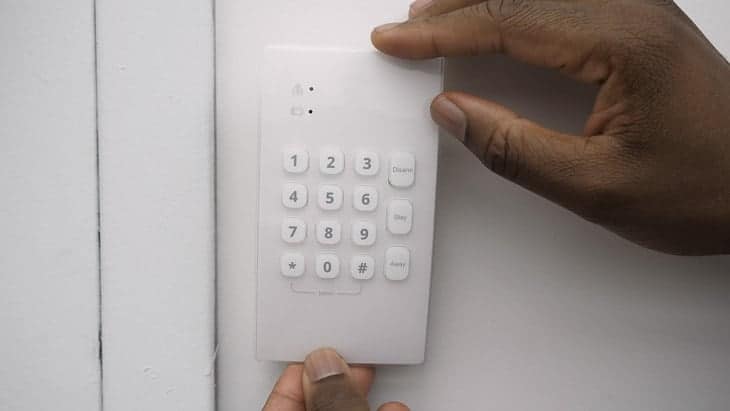
Most of the Frontpoint security system is wireless, which definitely makes installation a lot easier. The sensors and even the keypad are peel-and-stick, my personal favorite installation method, and everything comes pre-programmed with the hub. In the same vein as ADT, installing the Frontpoint camera was the most complicated part, but it wasn’t too bad. I just had to plug in the ethernet and power cables, add the camera on the Frontpoint website, and connect it to my Wi-Fi. The process took a little under an hour, so I’m pretty happy!
Top System Installation
This really depends on your preference. Go with ADT if you want to sit back and let professionals take care of the installation, but go with Frontpoint if you want a more hands-on approach.
>> Learn More: See our pick for the Best Home Security System
Professional Monitoring
Looking to self-monitor through your app? Then head over to our SimpliSafe review — you can’t self-monitor either of these systems. Sorry, but you’re going to be paying a monthly fee for both.
This is a bit of a double-edged sword for folks. Yes, you’re going to be plunking down the credit card every month, but it also takes the responsibility off of you to keep up with your security system every time your phone buzzes. Wherever you are, if there’s an emergency at your home, the professionals can take care of it. They’ll check in with you and your home and if they determine it’s necessary, you can contact the police, hospital, or fire department for you. I wish I had them for every aspect of my life!
ADT vs. Frontpoint Monitoring Options
ADT and Frontpoint’s monitoring options work pretty differently. With Frontpoint, there’s only one monitoring plan: the Ultimate plan for $49.99 per month. This plan includes every feature in Frontpoint’s arsenal, including video monitoring, video storage for videos, and home automation. If you ever decide to expand your system, you won’t have to upgrade your plan.
With ADT Pro Install, monitoring starts at $49.99 per month, with higher tiers available depending on the features and level of coverage you need. See ADT’s current pricing for the latest plan details.
No matter which plan you choose on which system, you’ll get cellular backup along with your 24/7 professional monitoring. What does that mean, exactly? It means that your system will stay on even if your neighborhood’s power goes out. And that’s a good thing, in case you didn’t know!
I also wanted to explain the two more esoteric features of Frontpoint. One, they offer crash and smash protection, which means that if someone tries to (you guessed it), crash or smash your control panel, the professional monitoring team will be notified immediately and can send help. The second thing is the geolocation services. In a nutshell, you can connect your family’s phones to your Frontpoint system and stay updated on their locations. This seems a bit creepy to me, and unnecessary as most smartphones have their own internal location services.
Unfortunately, ADT’s pricing is not much better. While I can’t give you exact prices, I can say that you’ll pay a minimum of $28.99 a month for traditional security monitoring. If you want life safety monitoring, referring to smoke and carbon monoxide sensors, that cost will rise to $35.99 a month. And if you want to add an indoor and an outdoor camera, the cost goes to $57.99 a month! Of course, the exact pricing will depend on your equipment, but be sure to negotiate with your salesperson.
ADT vs. Frontpoint Contracts
ADT offers both three-year contracts and month-to-month options depending on the plan you choose, giving you flexibility based on your commitment preferences. Frontpoint, on the other hand, requires a contract — though the length depends on whether you finance your equipment. If you pay upfront, you can go month-to-month. With financing, your Frontpoint contract can be up to three years.
ADT vs. Frontpoint Moving Policies
With Frontpoint’s DIY installation, moving your system is simple — just pack it up and take it with you, and let Frontpoint know before you go. With ADT, moving with your system is a different process, as it’s professionally installed at your current address. Contact ADT before your move to review transfer options. If portability is a priority and you want a DIY setup you can take anywhere, ADT Blu is worth considering as an alternative.
Top System for Monitoring
Regarding professional monitoring, it’s a closer call than it used to be. ADT Pro Install starts at $49.99 per month and now offers month-to-month flexibility, which closes the gap with Frontpoint considerably. That said, Frontpoint’s single all-inclusive plan keeps things simple, and its overall value is hard to argue with. Frontpoint edges this one out, but ADT is no longer the clear loser here.
ADT vs. Frontpoint Customer Support
| ADT | Frontpoint | |
|---|---|---|
| Features | Live chat, phone, Facetime, online help center | Online FAQs, Phone |
| Google Rating | 2.5 | 4.5 |
Contacting customer support? Not ideal no matter who you are or what the situation is. But it’s a reality of life, like flossing or doing your taxes. And if I’m investing hundreds if not thousands of dollars into my home’s security, then I want to ensure that customer support is on point.
Both ADT and Frontpoint offer online help centers as well as phone lines, but get this: ADT also gives you live chat and even FaceTime! Facetiming with an ADT customer support rep may seem like the most awkward thing imaginable, but I could see it being helpful if you want to show them an issue visually. Still, it’s a bit odd.
Next, I looked at what real customers had to say about ADT and Frontpoint’s customer support. Unfortunately, ADT only has a 2.5 rating on Google, which is pretty yikes! Plus, all of the reviews that mentioned customer support were negative. Clearly, this is not ADT’s strong suit.
Frontpoint, on the other hand, is known for its incredible customer support, some of the best in the business. That amazing reputation is reflected in their 4.6 overall Google rating, and let me tell you, I kept scrolling and scrolling and saw nothing but four and five-star reviews.
“Customer service has been professionally helpful each time that I have had questions. They won’t leave you hanging if you have an issue. All that and you get peace of mind knowing that you have someone watching your back”
wrote Jack Linamen in a five-star review. Sounds great to me!
Top System for Customer Support
Frontpoint has long been praised for its customer support, and the Google ratings reflect that. That said, ADT edges ahead in our own testing and scoring — its 24/7 availability via phone, live chat, and even FaceTime gives it more ways to reach a real person when it counts. It’s close, but ADT gets the nod here.
ADT vs. Frontpoint App
| ADT | Frontpoint | |
|---|---|---|
| Features | Arm or disarm your system, control any connected devices, livestream footage, & receive push notifications | Remotely arm & disarm your system, receive all push notifications, livestream or view recorded video, & control your lights, locks, & thermostats |
| Google Play Rating | 4.7 | 3.7 |
| Apple Store Rating | 4.8 | 4.3 |
The last thing I’ll write about is the app from which you’ll control and monitor your smart security system. We’ve all dealt with buggy apps, and I think we’re all in agreement that they’re zero amounts of fun. Let’s see if the ADT and Frontpoint apps spark joy.
The ADT+ App
From the ADT+ app, you’ll be able to arm or disarm your security system, control any connected devices, livestream footage, and receive notifications. In our hands-on testing, it stood out for how seamlessly it ties together ADT’s full ecosystem — cameras, smart home devices, and security controls all in one place.
The Frontpoint App
The Frontpoint app handles the essentials — arming and disarming, push notifications, live video, and control of lights, locks, and thermostats. It’s well-designed and easy to use, and Android users gave it a 3.7 while iPhone users rated it 4.3. Solid marks all around, but it doesn’t match the depth and integration of the ADT+ app.
Top System App
ADT wins this one clearly. The ADT+ app doesn’t just match Frontpoint’s functionality — it goes further, pulling together cameras, smart home devices, and security controls into a single cohesive experience that Frontpoint can’t quite replicate. ADT two, Frontpoint two. It all comes down to the recap.
Recap of ADT vs. Frontpoint
After going category by category, ADT comes out on top. Professional installation takes the hassle out of setup, the ADT+ app outperforms Frontpoint’s in depth and integration, and ADT’s customer support now edges ahead in our own testing thanks to its 24/7 availability and multiple contact options. Frontpoint puts up a real fight — its simplicity and DIY approach will appeal to a certain type of homeowner — but for most people, ADT’s experience and ecosystem are worth the investment.
Pick ADT if you’d like…
- Professional installation: A certified technician handles the full setup, walks you through the system, and makes sure everything is optimized for your home.
- A more capable app: The ADT+ app ties together cameras, smart home devices, and security controls in one seamless experience.
- 24/7 customer support: Phone, live chat, and even Facetime — ADT has more ways to reach a real person when you need one.
- Tailored monitoring: Your plan is built around your specific equipment and needs, not a one-size-fits-all package.
Pick Frontpoint if you’d like…
- DIY installation: Frontpoint’s peel-and-stick setup is genuinely easy and takes under an hour.
- Simpler pricing: One all-inclusive plan means no decisions to make once you’ve chosen your equipment.
- Flexible contracts: Pay for your equipment upfront and go month-to-month without a long-term commitment.
That’s it for me! To learn more, read our full written Frontpoint review or our ADT review.
Frequently Asked Questions
Still have a few questions about ADT and Frontpoint? You’ll find answers to some of the most common questions below.
-
Is Frontpoint better than ADT?
No. Overall, ADT is still better than Frontpoint. While Frontpoint provides more flexibility with its monthly contracts and DIY installation, ADT is more established. Plus, professional installation really takes the service to the next level. It’s true that ADT is more expensive, but you get what you pay for with this alarm company.
-
What company is better than Frontpoint?
We’ve discussed ADT, but if you’re looking for a DIY system that is better than Frontpoint, we’d say Cove is worth a closer look.
-
Does Frontpoint work without Wi-Fi?
Yes, Frontpoint works without Wi-Fi. Specifically, the hub can work using a cellular connection. Because Frontpoint’s hub can work with both Wi-Fi and cellular, though, you may want to consider using both. Using both means you have a backup should one fail.
-
How much does ADT cost?
ADT monitoring starts at $49.99 per month, with higher tiers available depending on the equipment and features you choose. Equipment costs vary based on what you include in your system.