



When you think of ads, you probably think about annoying pop-up or video ads that play before the content you want to watch. But ads come in many forms, and some of them can actually be dangerous. For example, clicking on malicious ads will send you to a phishing website that tries to collect your personal information.
Adware is a particularly nefarious type of malicious ad. Instead of merely popping up on a website, adware is a piece of unwanted software that’s downloaded onto your device and delivers you ads whatever you’re doing – whether you’re in a virtual work meeting, playing, or enjoying a movie. Getting rid of adware means having fewer annoyances, less strain on your computer’s memory, and a lower risk of security issues.
What Is Adware?
Adware is a piece of software that downloads advertising material into your device without your knowledge. The ads are often benign, but the way they are brought to you is morally questionable. The good news is you can stop adware simply by using antivirus software. Antivirus software can not only stop the process of downloading advertising material without your permission, but also get rid of the offending software. Here are the best antiviruses we’ve tested:



Who Does Adware Target?
Adware targets both individuals and businesses, but it targets individuals more commonly, often by offering new games, movies, or deals that turn out to be fraudulent.1 You know the saying — if something seems too good to be true, it probably is.

How Adware Spreads
Adware typically finds its way onto your device through one of two routes:
- Users download a free program (called freeware or shareware) that they don’t know contains adware.
- Users go to websites infected with adware that takes advantage of vulnerabilities within browsers, downloading adware in files.
What Adware Does
We all know by now that ads generate revenue through views and clicks. Websites with ads, for example, get paid when a visitor views and clicks an ad displayed.
What adware does is it forces you to view and click ads to generate income. For example, it can inject a code into the source code of every page you visit. When you click on anything on that page, your computer opens an ad window that registers as an ad click.
Aside from ads themselves, adware can contain trackers that monitor what websites you visit. The adware then uses that to show you even more targeted ads. Some adware goes even further — selling your browsing data to third-party ad networks to squeeze out more revenue. It’s a vicious cycle where the adware creator always comes out on top, at the expense of your privacy, digital safety, and sanity.
Is Adware a Virus?
Because of how adware operates – initiating processes on your device without your permission – they are commonly thought of as computer viruses. That’s a misconception, though. Adware is not a type of virus or malware. Rather, adware is a potentially unwanted program, abbreviated (adorably) as PUP.
As a PUP, adware doesn’t set off the same alarm bells as malware or viruses. Antivirus software prioritizes flagging true threats. Many tools actually let you dismiss PUP alerts entirely. That’s exactly what makes adware so sneaky — it slips under the radar by design.
Types of Adware
Adware is not all created equal. There are different types of it, including these:
- Legitimate adware: Legitimate adware is any online advertisement that doesn’t contain malware (no matter how annoying it may be).
- PUPs: Potentially unwanted programs are any software that you didn’t ask to be installed on your device.2
- Browser hijackers: Browser hijackers change your browser settings without your knowledge or consent, typically affecting both homepage and default search settings.
- Device-specific: Different devices and operating systems have different types of adware, so adware for Macs may look different from adware for Windows computers.
Adware vs. Spyware vs. Malware vs. PUP vs. PUA
With so many abbreviations, the differences between PUP, PUA, and the like can get confusing, but in a nutshell, malware is an umbrella term that includes:
- Viruses
- Spyware
- Adware
- Phishing
Note: While adware is a type of malware, not every type of malware is adware, much like squares and rectangles respectively.
Spyware, specifically, collects the personal information of users and sells it to third parties. Sometimes, it installs Trojan viruses.3 PUPs, potentially unwanted programs, are also known as PUAs, or potentially unwanted applications. They often come bundled with legitimate free software. The most common types of PUAs are adware and spyware. 4
How Do You Get Adware?
Most people get adware by downloading a program, typically freeware or shareware, that contains it. Of course, people aren’t aware of this, as the program’s author signed up with the adware vendor to gain additional revenue (and probably isn’t advertising this fact). Otherwise, users can get adware by visiting devices that are infected with adware. If the user’s browser has vulnerabilities, the adware can download in what’s called a drive-by download.

Is Adware Legal?
By and large, adware is illegal in the U.S., but let’s dive a bit deeper into state and federal laws.
State Laws
Currently, 21 U.S. states plus Guam and Puerto Rico have laws about spyware, which includes adware.5 For example, California’s Consumer Protection Against Computer Spyware Act says, “A person or entity conducting business in this state, who is not an authorized user … shall not knowingly cause computer software to be copied onto the computer of a consumer.”6
Federal Laws
Under the Computer Fraud and Abuse Act (CFAA), causing damage to 10 or more protected computers during a one-year period can be charged as a felony if the aggregate losses total $5,000 or more.7 The CFAA covers the installation of malicious software — including adware — that results in unauthorized access or damage to protected computers.
Signs of Adware
There are various telltale signs that your device has an adware infection.
Pro Tip: None of these signs on their own necessarily indicate adware; for example, a VPN may slow down your device rather than adware. However, a combination of several of the below signs may indicate an adware infection.
Slow Computer and Browser
Adware scans bog down your processor and take up a lot of memory space, slowing down your computer significantly.
Many Ads
Sure, we’re all accustomed to running into dozens of online ads a day. But if you’re getting more pop-ups than usual or unclosable ads that keep redirecting you to other pages, this could be a sign of adware.
Crashing
If too many ads show up, your program may crash and your device may freeze.
Changes to Browser’s Homepage
Is your browser’s homepage different without you having made any changes? You may be redirected to a new page that installs more PUPs in the form of adware or malware. You may also see:
- Ads in places where they shouldn’t be: For example, Security.org doesn’t display ads, so if you see ad banners on our website, you probably have adware.
- Common web pages not displaying properly: For example, if you see random words in blue underlined texts (hyperlinks) that open multiple ad windows when clicked.
- New extensions, plugins, software applications, and/or toolbars that you don’t remember installing: For example, if you see a Chrome Extension installed that is vaguely called ‘Apps’ with a broken thumbnail (an actual adware we encountered).
How to Prevent Adware
Adware can make your computer slow and your browsing experience a pain in the you-know-what. But don’t worry; there are multiple ways to prevent adware from infecting your devices.
- Use antivirus software. The easiest way to block adware is to use antivirus software that can detect malware before it infects the rest of your device. The program will quarantine the adware in a virtual sandbox; we like to think of it as a timeout for adware.
- Perform updates. Software updates may contain security patches, so update your device as soon as you can.
- Only download apps from known app stores. The App Store and the Google Play Store scan all apps for malware, but if you jailbreak your device, then you could be downloading malicious apps. We like control as much as the next person, but when it comes to apps, it’s best to stick to Apple’s and Google’s recommendations.
- Don’t click on pop-up ads. We all want flatter stomachs and whiter teeth, but resist clicking on pop-up ads, as they could contain even more PUPs/PUAs.
- Beware of phishing. Phishing attacks are more convincing than ever. Emails, links, and websites can look totally legit at first glance, so always verify before you click. We recommend using Google’s Transparency Report to check the authenticity of URLs.
How to Remove Adware
Despite the precautions, accidentally downloading adware is always a possibility whenever you’re online. Here’s how to remove adware if need be.
Safari (iOS and macOS)
Safari is the default browser on iOS and macOS devices. To remove adware from Safari, follow these steps:
- Update to the latest version of macOS.
- Once that update is complete, restart your device. Its built-in tool should remove the adware.
- Check your Applications folder for any unfamiliar apps. If there are, uninstall them.
- Open Safari, go to Settings, then Extensions, and look for anything unfamiliar. If you spot an extension you didn’t install, turn it off and delete it.
- If you continue to see PUPs, PUAs, or adware, contact Apple online or by calling 1-800-275-2273.8
Chrome (Android)
Although Chrome is Google’s browser, you can use it on Android, Windows, macOS, or iOS devices. Follow these steps to remove problematic apps from Chrome on your Android:
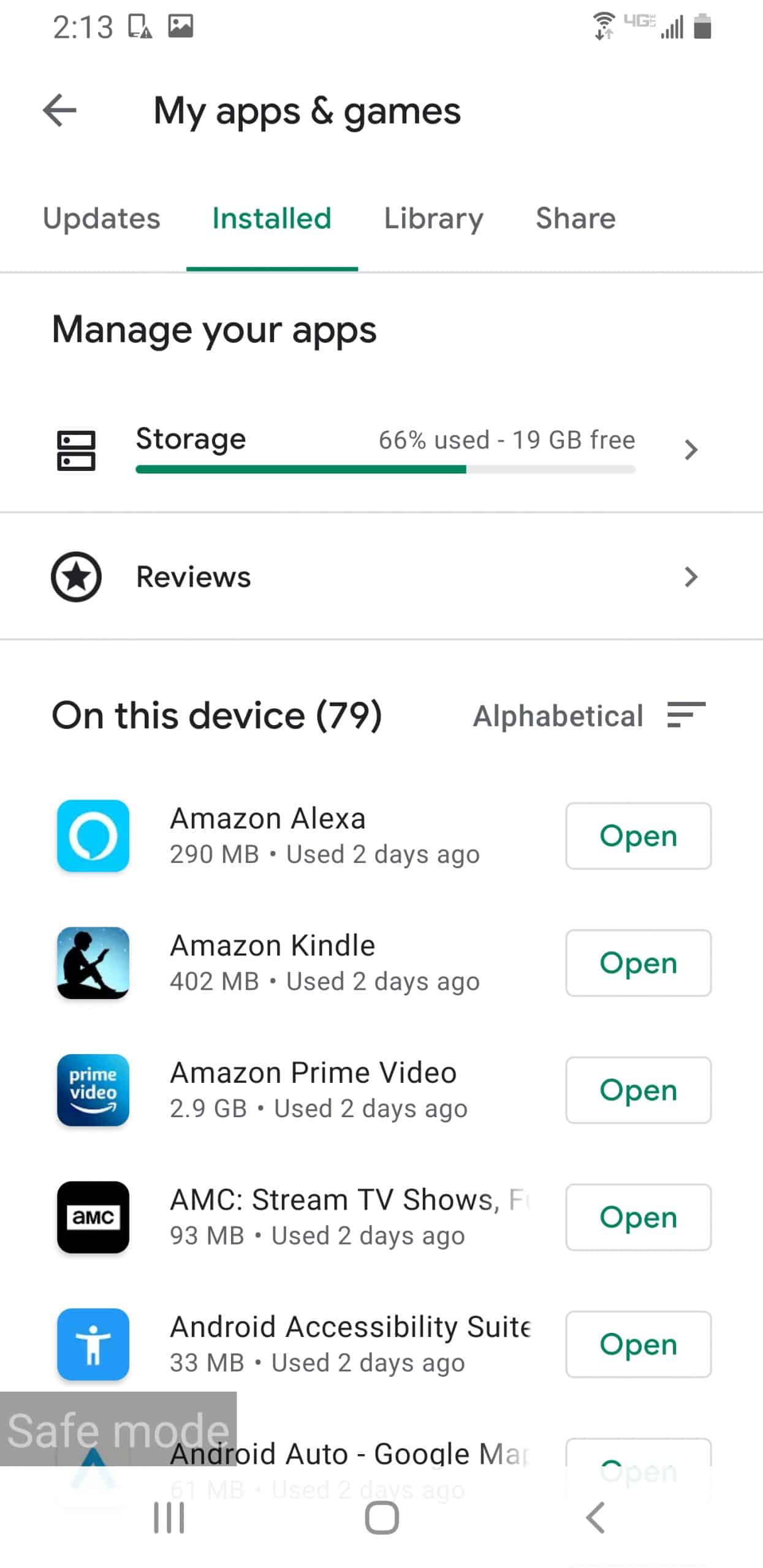
- Press and hold the power button to turn the power off. Now, your device will start in safe mode.
- Head to the Google Play Store, tap your profile icon in the top right, and select “Manage apps & device.”
- Tap “Manage,” then filter by recently installed apps to spot anything suspicious.
- Select the suspicious app and tap Uninstall.
- Restart your Android.
- See if removing the apps got rid of the malware.
- Repeat as necessary.
To protect your Android from problematic apps:
- Go to the Google Play Store.
- Click Menu.
- Click Play Protect.
- Turn on Scan Device for Security Threats.
- Download an anti-malware app, like one from the best antivirus software for Androids.
- For more information, read about how to remove a virus on Android.

To stop notifications from certain websites:
- Go to Chrome.
- Click Web Page.
- Click More (the three vertical dots in the upper right-hand corner of the browser window).
- Click Site Settings.
- Click Permissions.
- Click Notifications.
- Set notifications to Off.
Chrome (Windows)
Follow these steps to remove adware from Chrome on your Windows device:
- Go to Chrome.
- Click More.
- Click Settings.
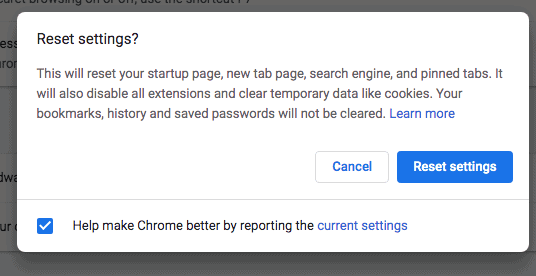
- Click Reset settings (in the left-hand sidebar).
- Click Restore settings to their original defaults.
- Click Reset settings to confirm.
- Reboot your computer.
- If you suspect unwanted software is still present, consider running a scan with a trusted antivirus tool.
FYI: Google removed the built-in “Clean Up Computer” (Chrome Cleanup Tool) feature starting with Chrome 111 in March 2023. If you’re on a newer version of Chrome for Windows, use the Reset settings option directly, or run a dedicated antivirus scan to catch any lingering adware.
Chrome (macOS, Chromebook, Linux)
Cleaning up Chrome adware on your macOS, Chromebook, or Linux device is easy.
- Open a Finder window.
- Click Applications.
- Look for unfamiliar programs.
- If you find any, right-click on them and drag them to your Trash folder.
- Empty your Trash folder.
- Go to Chrome.
- Click More.
- Click Settings.
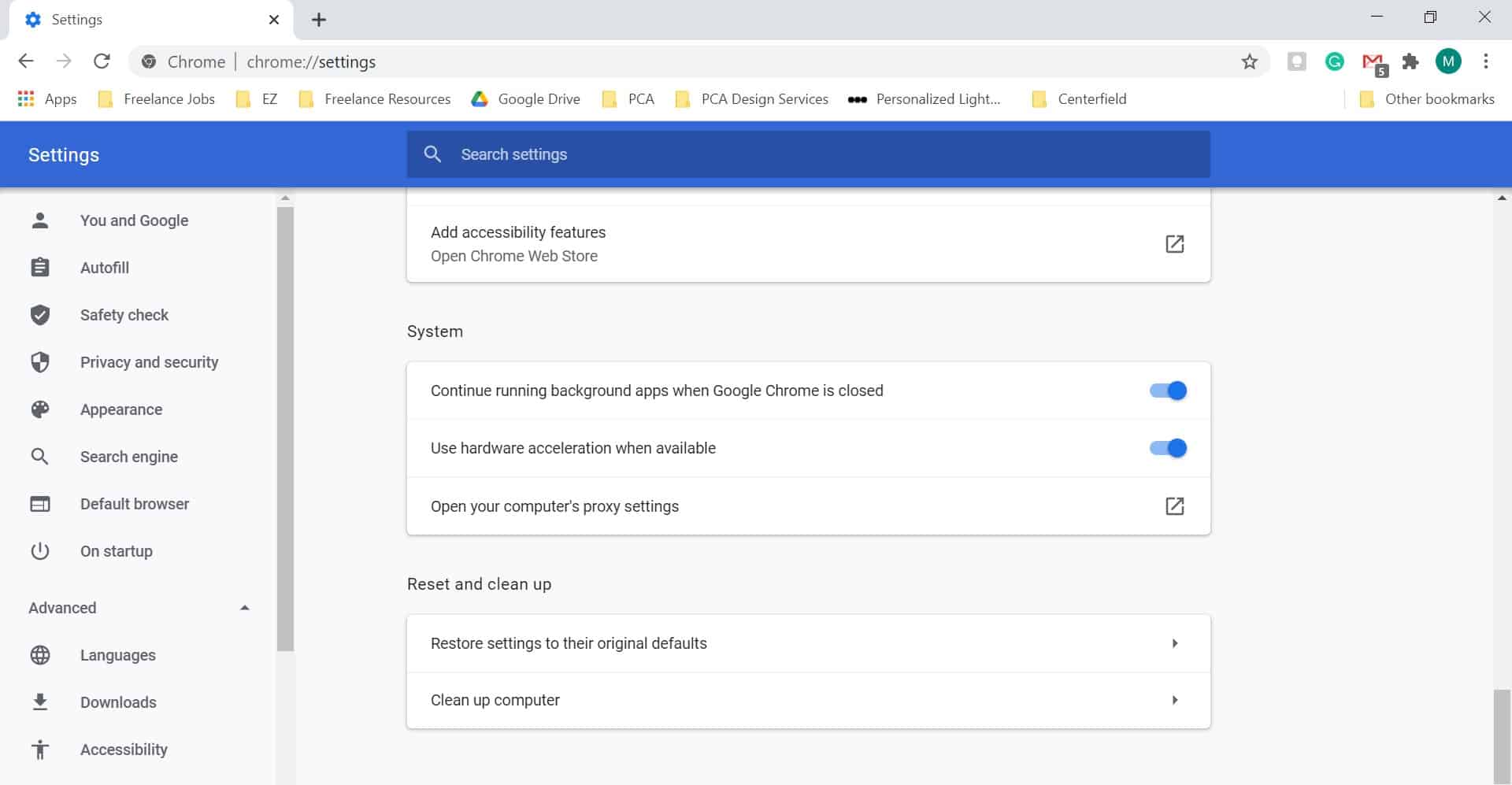
- Click Advanced.
- Click Restore Settings to Their Original Defaults.
- Click Reset Settings.

Chrome (iOS)
iOS devices are like iPhones, and iPads don’t need antivirus software. However, if pop-ups are, well, popping up too much, here’s how to get rid of them:
- Go to Chrome.
- Click More.
- Click Settings.
- Click Content Settings.
- Click Block Pop-Ups.
- Turn on Block Pop-Ups.9
Microsoft Edge (Windows)
Microsoft retired Internet Explorer on June 15, 2022, so if you’re still using it, it’s time to switch. Microsoft Edge is the default browser on Windows 10 and 11, and while Windows comes with Microsoft Defender Antivirus built in, adware can still slip through. If it does, here’s how to address it:
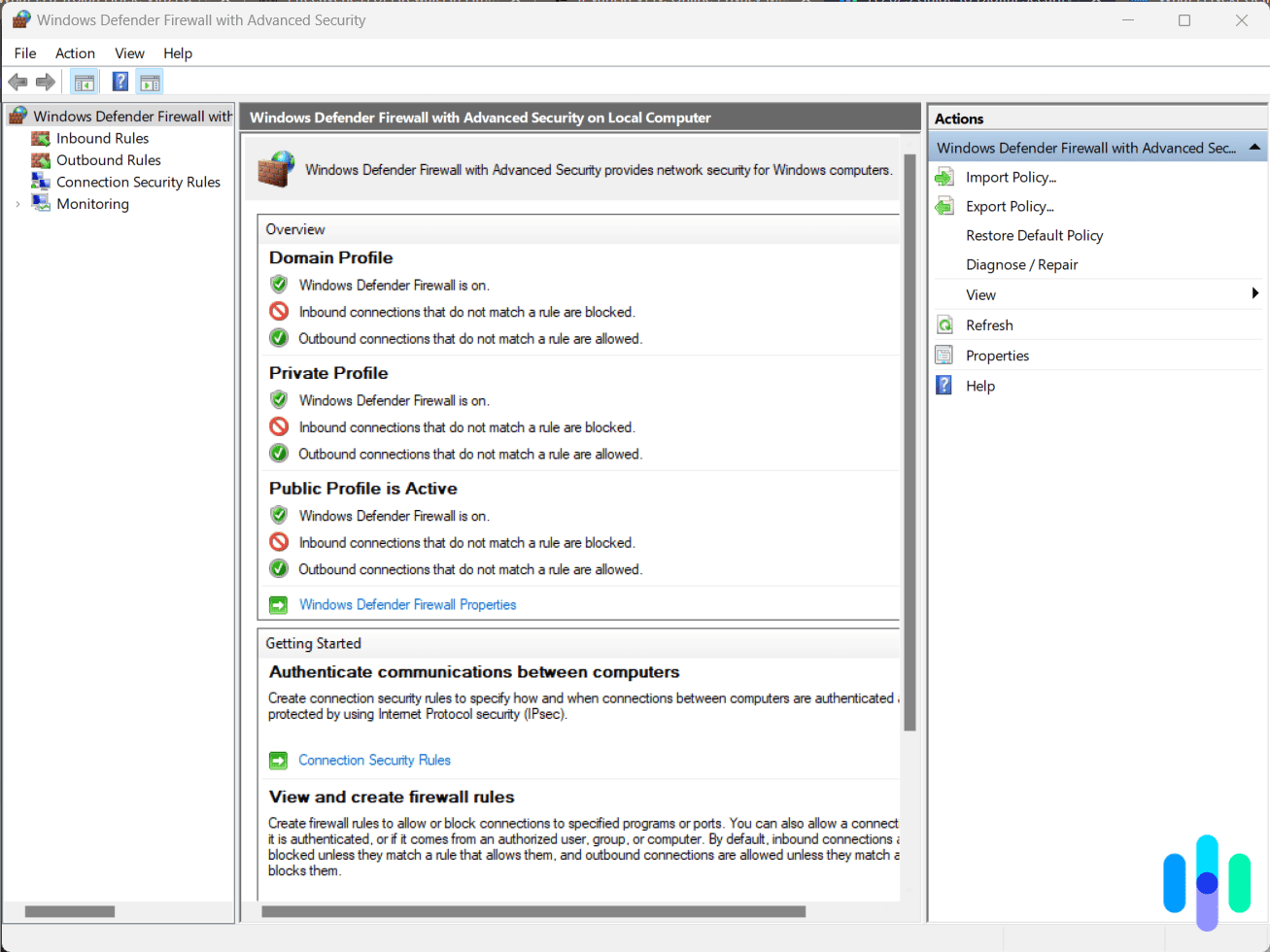
- Run a scan using Windows Security (formerly Windows Defender) to detect and remove threats.
- Use the Microsoft Safety Scanner as a second opinion tool to catch anything that slipped through.10
- If the Microsoft Safety Scanner didn’t detect the adware, submit a sample to Microsoft’s Security Intelligence portal.11
Mozilla Firefox (All Devices)
To remove adware from Firefox, you can either reset it to factory defaults or remove just the malicious toolbar. To reset it to factory defaults:
- Click on the hamburger menu button.
- Select the question mark icon at the bottom of the menu.
- Click Troubleshoot Information.
- Click Reset Firefox.
To remove the malicious toolbar:
- Click Menu.
- Click Add-Ons.
- Click Extensions.
- Select the toolbar you want to remove.
- Click Remove.
- Click Restart Now.12
Online Advertising
We’re huge fans of Mad Men, so adware is of particular interest to us. Of course, we’ve come a long way since ads were only in the paper and on billboards. Now, advertisements can be found almost anywhere online and offline, including our email inboxes and social media accounts. Let’s take a closer look at the ads themselves.
Types of Ads
On the internet, ads can be divided into three categories: PPC, PPI, and PPV. Alphabet soup, anyone?
- PPC: PPC stands for “pay per click,” meaning that the advertiser only pays the publisher when a user clicks on their ad.
- PPI: PPI stands for “pay per impression.” Instead of paying per click, advertisers pay a CPM, or a cost-per-thousand rate. In English? They pay every time 1,000 ads appear on users’ networks.13
- PPV: Lastly, there’s “pay per view,” otherwise known as CPV, or cost per view. With PPV ads, advertisers pay every single time a user views their ad, as opposed to every time 1,000 ads appear on users’ networks.14
Why Companies Advertise
Looking at annoying pop-ups or tacky online banners, you may be wondering why companies advertise in the first place. Are ads really effective, and what is their purpose? Here’s why companies advertise, according to Duct Tape Marketing:
- To increase revenue
- To target customers
- To create brand awareness
- To add credibility
- To amplify their mission15
History of Adware
Like Windows 95 and Toy Story, adware first appeared in 1995. At first, companies used it the same way they used print advertising, paying adware vendors to spread their material legitimately. However, people soon began adding adware into operating systems, breaking the law.16 Adware peaked from 2005 to 2008; after 2008, most legitimate companies learned to distance themselves from illegal adware, preferring legal forms of advertising.17
Adware never really went away, though — it just evolved. By the early 2020s, adware had become one of the most pervasive forms of malware targeting both consumers and businesses. It still consistently ranks among the most common malware threats on both Windows and Mac devices.18 On mobile, adware is especially aggressive, with some adware apps collectively racking up millions of downloads before being flagged. So while legitimate companies have moved on from shady adware tactics, the threat itself is alive and well.
Recap
Adware can come in insidious forms, be it PUPs or phishing emails. However, removing adware from your devices is pretty simple, so even if they’re infected, it’s not the end of the world. After all, even the best antivirus software can’t catch everything! Learn more about how antivirus software works or how much antivirus software costs. You’ll be on your way to a clean and fast browsing experience in no time.
Adware FAQs
With a barrage of pop-ups and flashing online banners, adware can be overwhelming, but don’t worry — we’re here to answer the questions you ask the most.
-
What is an adware virus?
Adware is actually not a virus but a type of malware that advertisers pay for. It displays ads on computers and mobile devices. Rather than being a virus, adware is a potentially unwanted program (PUP), otherwise known as a potentially unwanted application (PUA).
-
How dangerous is adware?
Adware is not the most dangerous type of malware, but it can slow down your browser, crash your device, and sell your data to third parties to create targeted advertisements. Some adware can also hijack your browser, changing its settings without your knowledge or consent.
-
How do you stop adware?
The easiest way to stop adware is to install antivirus software. You should also perform software updates as soon as possible, only download apps from your device’s official app stores, and avoid clicking on pop-up ads or suspicious links, emails, or websites.
-
Why is adware bad?
Adware is bad because it can sell your data to third parties, slow down your device, change your settings, and potentially crash your browser. Adware also makes browsing the web a worse experience, as you’ll be barraged with redirects, banners, and pop-ups.